To take a deposit on a Shopify pre-order, use a purchase options app and set it to charge only part of the price at checkout. Shopify alone cannot sell this way, so pre-orders need an app.
In the Shopify app SellRules, this feature is called “Deposits and balance payments”. For each pre-order or made-to-order schedule, you decide three things:
- Set “Payment” to “Deposit now, balance later (partial payment)”
- Set the deposit as a percentage of the product price (for example, 30%) or as an amount per item
- Set the “Balance due date” as a number of days after the order (for example, 30 days later) or as a specific date
On the due date, the balance is charged automatically to the payment method the customer saved at checkout. The customer does not have to check out a second time.
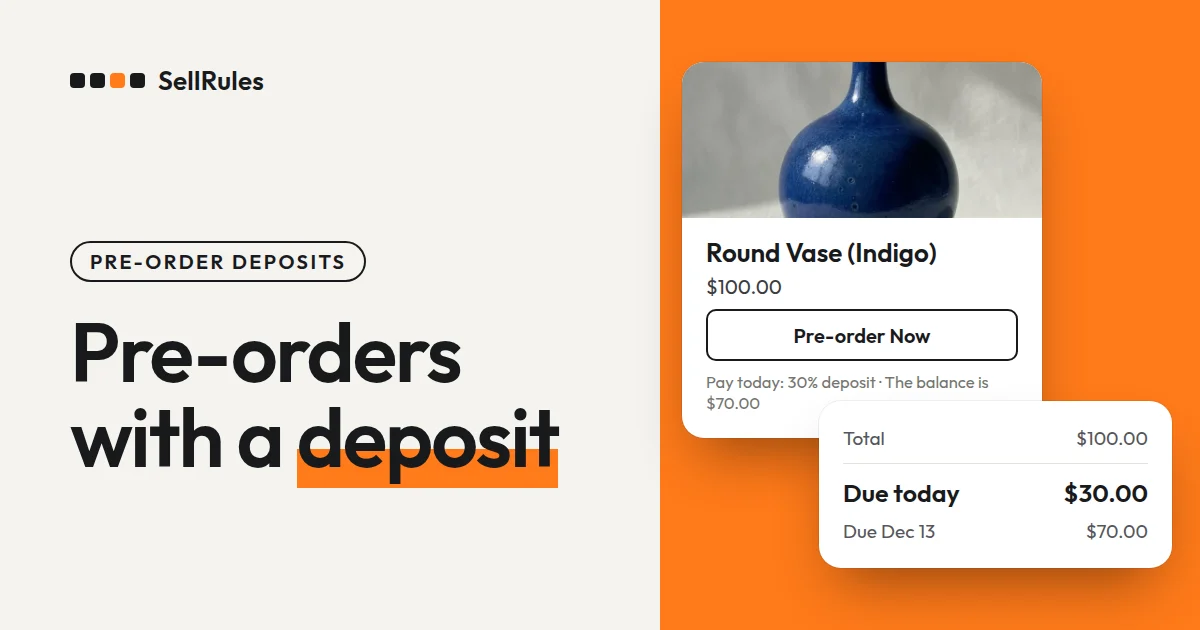
For example, if you take a 30% deposit on a $100 vase, you collect $30 at checkout and $70 on the due date.
What customers see
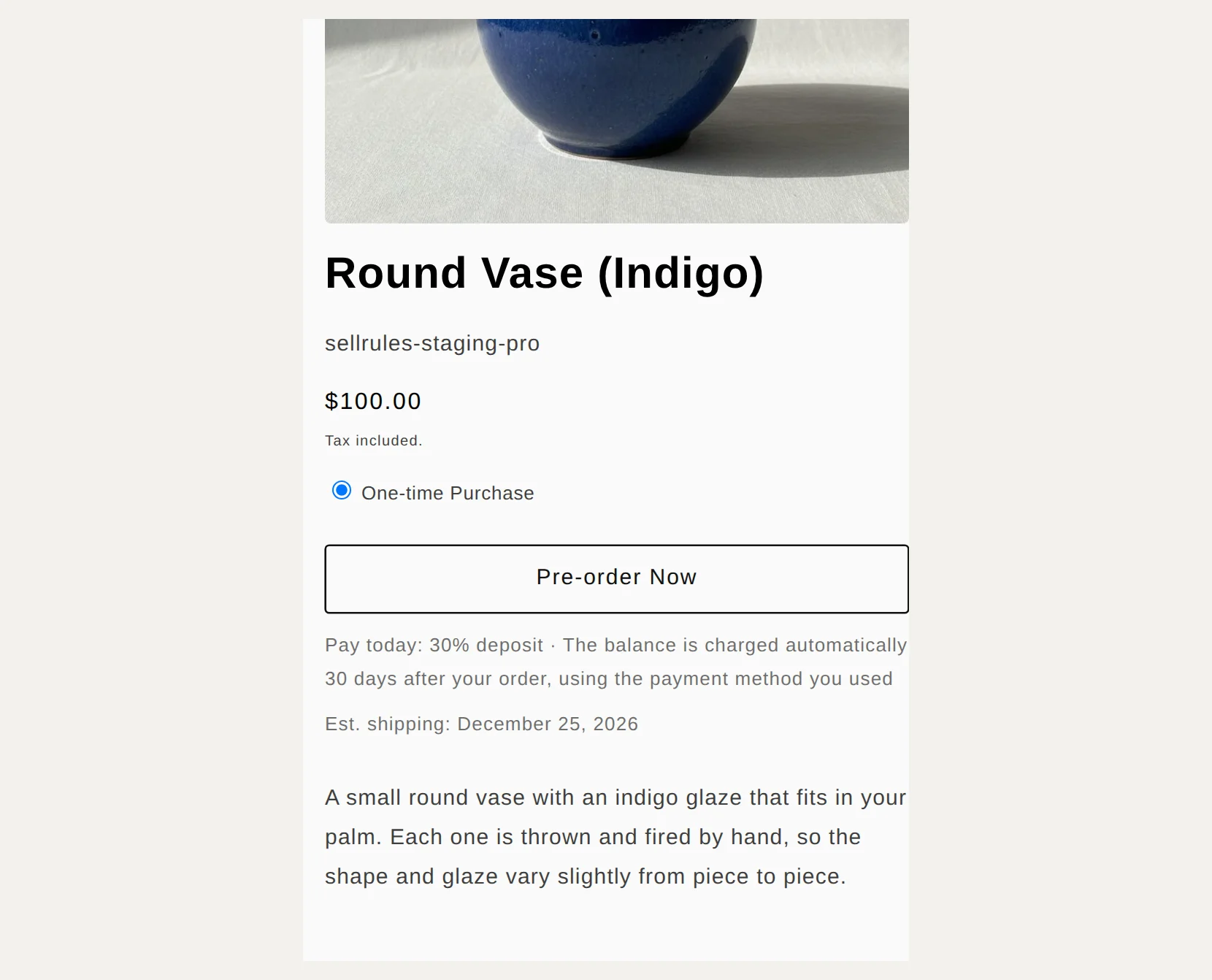
On the product page, the buy button changes to “Pre-order Now”. Below it, the page shows how much the customer pays today and when the balance will be charged.
The screenshot below is from a demo store that sells in US dollars: a $100 item with a 30% deposit and the balance due 30 days later.
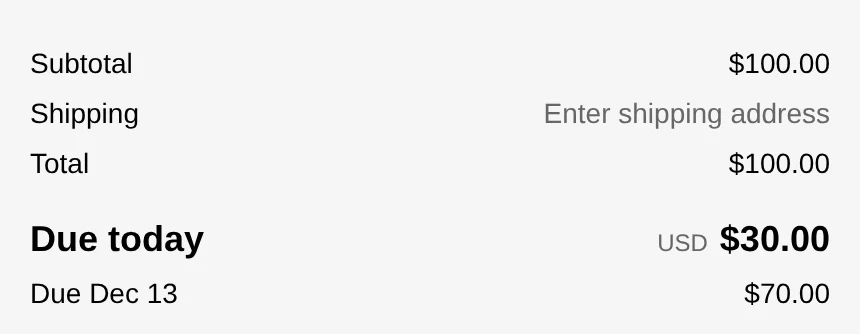
At checkout, the totals show the amount due today and the amount due on the due date as separate lines.
The payment section reads “Your card will be charged on December 11.”
Before the customer clicks “Pay now”, they agree to have the balance charged automatically on the due date. Shopify’s checkout shows that agreement text, not SellRules.
After the order is placed, this is what happens for the customer and for you.
| When | What happens |
|---|---|
| At checkout | The deposit (for example, $30) is charged and the payment method is saved |
| 3 days before the balance due date | The customer gets a “Balance payment reminder” email |
| On the balance due date | The balance (for example, $70) is charged automatically to the saved payment method |
| Until the balance is paid | The order carries a fulfillment hold for the unpaid balance, which is released automatically once payment goes through |
The fulfillment hold keeps you from shipping an order before you have collected the balance.
How this differs from plain Shopify and manual billing
Splitting deposit and balance by hand vs. SellRules deposits and balance payments
Manual (deposit product + invoice)
SellRules deposits and balance payments
Shopify Help says you need a pre-order app to sell pre-orders (Shopify Help, checked November 11, 2026). Without an app, the manual route is to create a separate deposit product, sell that, and send an invoice for the balance later.
How to set it up in SellRules
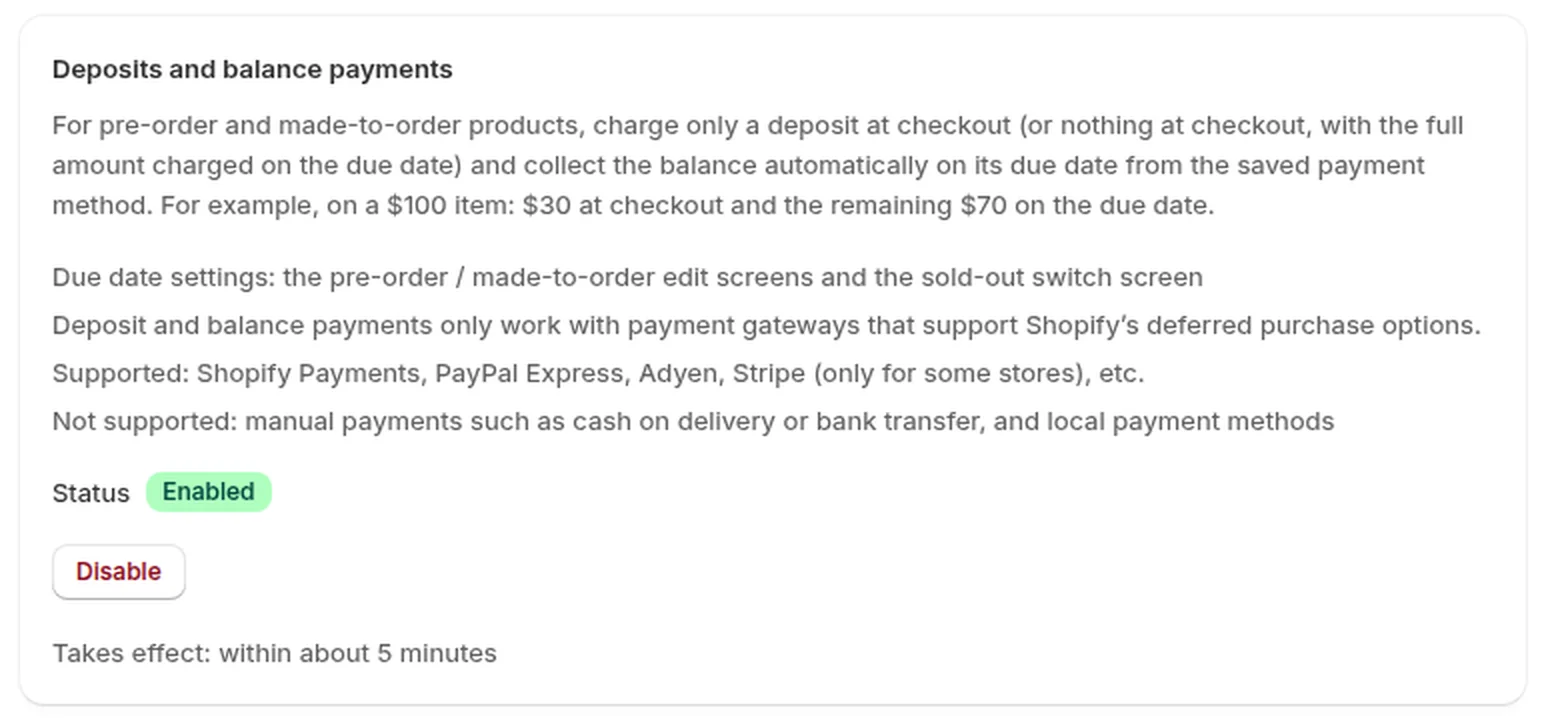
- In SellRules, go to “Settings” → “Deposits and balance payments”, click “Enable” and approve the permissions on Shopify’s approval screen. The status changes to “Enabled”, and it takes up to about 5 minutes to reach your store.
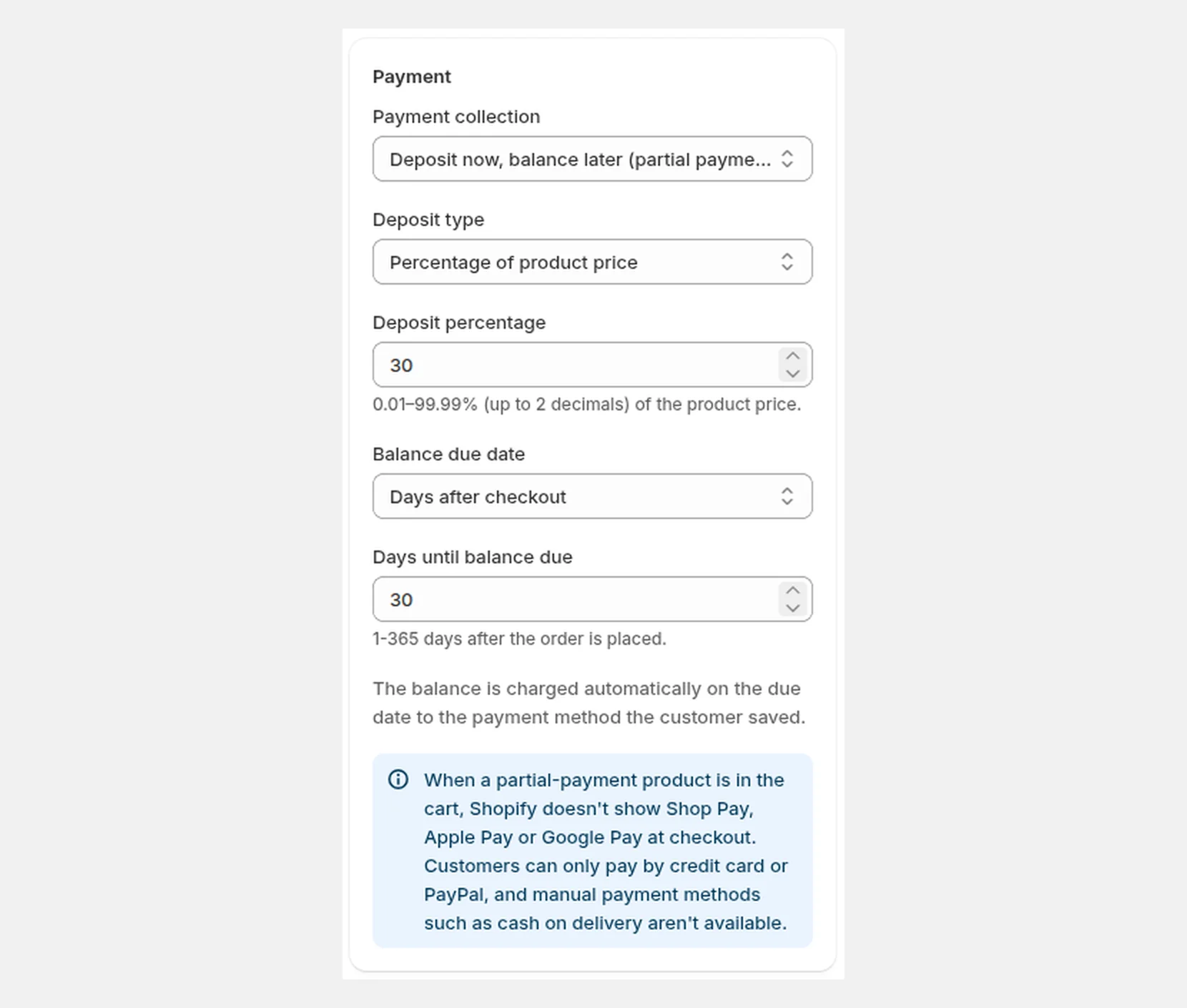
- Under “Sales schedules”, create a pre-order (or edit one) and click “Show extra settings”. Under “Payment”, choose “Deposit now, balance later (partial payment)”.
- Choose a “Deposit type”. For “Percentage of product price”, enter 0.01–99.99%. For “Fixed amount (currency)”, enter an amount per item (it must be less than the product price).
- Set the “Balance due date”. For “Days after checkout”, enter 1–365 days. For “Specific date”, enter a future date.
- Save.
Set the balance due date before the estimated shipping date. That leaves you time to contact the customer and get them to pay again if the charge fails on the due date.
The “Deposits and balance payments” section from step 1 also lists the payment methods that work.
What to check with a test purchase
Before you go live, place one order with a test payment and check these three places.
| Where to look | What you should see |
|---|---|
| Product page | The button reads “Pre-order Now”, with the deposit percentage and the balance charge timing below it |
| Checkout | “Due today” is the deposit amount, and the due-date line below it is the balance |
| SellRules “Order progress” | The order shows its balance due date |
If what you see does not match your settings, check these in order.
| Symptom | Cause | Fix |
|---|---|---|
| No deposit note on the product page | It has been less than 5 minutes since you enabled “Deposits and balance payments” | Wait about 5 minutes and reload the product page |
| Checkout charges the full amount | “Deposits and balance payments” is “Disabled” in settings | Go to “Settings” → “Deposits and balance payments” and click “Enable” |
| You cannot choose “Deposit now, balance later (partial payment)” under “Payment” | You are on the Free plan | Switch to the Launch plan |
What deposits and balance payments cannot do
Check these three things before you start.
Some payment methods are not available. When a deposit product is in the cart, Shopify does not show Shop Pay, Apple Pay or Google Pay at checkout. Customers can pay only by credit card or PayPal. Manual payment methods such as cash on delivery and bank transfer, and local payment methods, do not work either. If many of your customers pay another way, add a line to the product description such as “Payment is by credit card or PayPal only.”
Your payment setup must support it. Supported gateways include Shopify Payments, PayPal Express and Adyen. Stripe works only for some stores.
A failed balance charge is not retried automatically. If the balance cannot be charged, for example because the card has expired, both the customer and you get an email. The order is not canceled automatically, and its fulfillment hold stays in place. Ask the customer to check their payment method, then click “Retry collection” on that order in “Order progress”. To avoid double charges, the balance is charged again only when you click the button.
Pricing
Deposits and balance payments are available on the Launch plan (US$7.99 per month). The emails an order needs, such as the “Balance payment reminder”, are sent at no extra charge.
You cannot choose deposits on the Free plan. The Launch plan has a free trial, so try one product with a deposit first and check the product page and checkout in a test purchase. You can install SellRules from the Shopify App Store, where you can also check pricing and trial terms.
Frequently Asked Questions
What deposit percentage should I charge?
Set it high enough to cover what you have to spend before production starts, such as materials or a supplier deposit. If you cancel an order, the deposit is refunded to the customer, so a deposit cannot make up for the loss from a cancellation.
Can I charge nothing at checkout and bill the full amount later?
Yes. Choose “No deposit (charge the full amount on the due date)” under “Deposit type”. The customer pays nothing at checkout, and the full amount is charged automatically on the “Balance due date”. The payment methods and plan are the same as for deposits.
Can I move the balance due date later if shipping is delayed?
Yes, one order at a time. In SellRules, open “Order progress”, click “Change due date” on that order and pick a date later than the current one. The customer gets an email saying the due date has changed.
What happens to the balances on orders already placed if I disable “Deposits and balance payments”?
Balances on orders already placed are still charged on their due dates. Only orders placed after you disable it change, and those are paid in full at checkout.
What happens to unpaid balances if I uninstall SellRules?
Shopify removes the deposit purchase options from your products, and unpaid balances are no longer charged automatically. For orders with a balance left, charge each one by hand with “Collect payment” on the order page in the Shopify admin. It is safer to uninstall only after all balances are collected.
Related articles:
- Seeing what else SellRules does: SellRules features
- Getting started with pre-orders: how to start selling pre-orders
- What to check during the trial: Five-minute quick start (run a pre-order on a test product)
- Choosing how to sell, such as early access or limited quantities: planning early-access and limited sales
- Deciding when to charge for a pre-order that ships a month or more out: when to charge for long pre-orders
- What to tell pre-order customers from checkout to delivery: pre-order customer communication
The vase and amounts are examples.