

How Many Days Should Your Shipping Estimate Be for a Side Business? How to Set It and Where to Post It
For a side business, take the slowest case in business days based on the days you can ship, add 1 day of buffer, and use the result as your shipping estimate. If you ship on Monday, Wednesday, and Friday, for example, the estimate is "ships within 3 business days of your order."
There are three steps:
- List the weekdays you can ship
- Find the slowest case in business days (2 business days in this example)
- Add 1 day of buffer (3 business days in this example)
Put that number, worded the same way, on product pages, in your shipping policy, and in the order confirmation email. You don't have to ship every day. As long as the estimate matches what you actually do, customers have nothing to worry about.
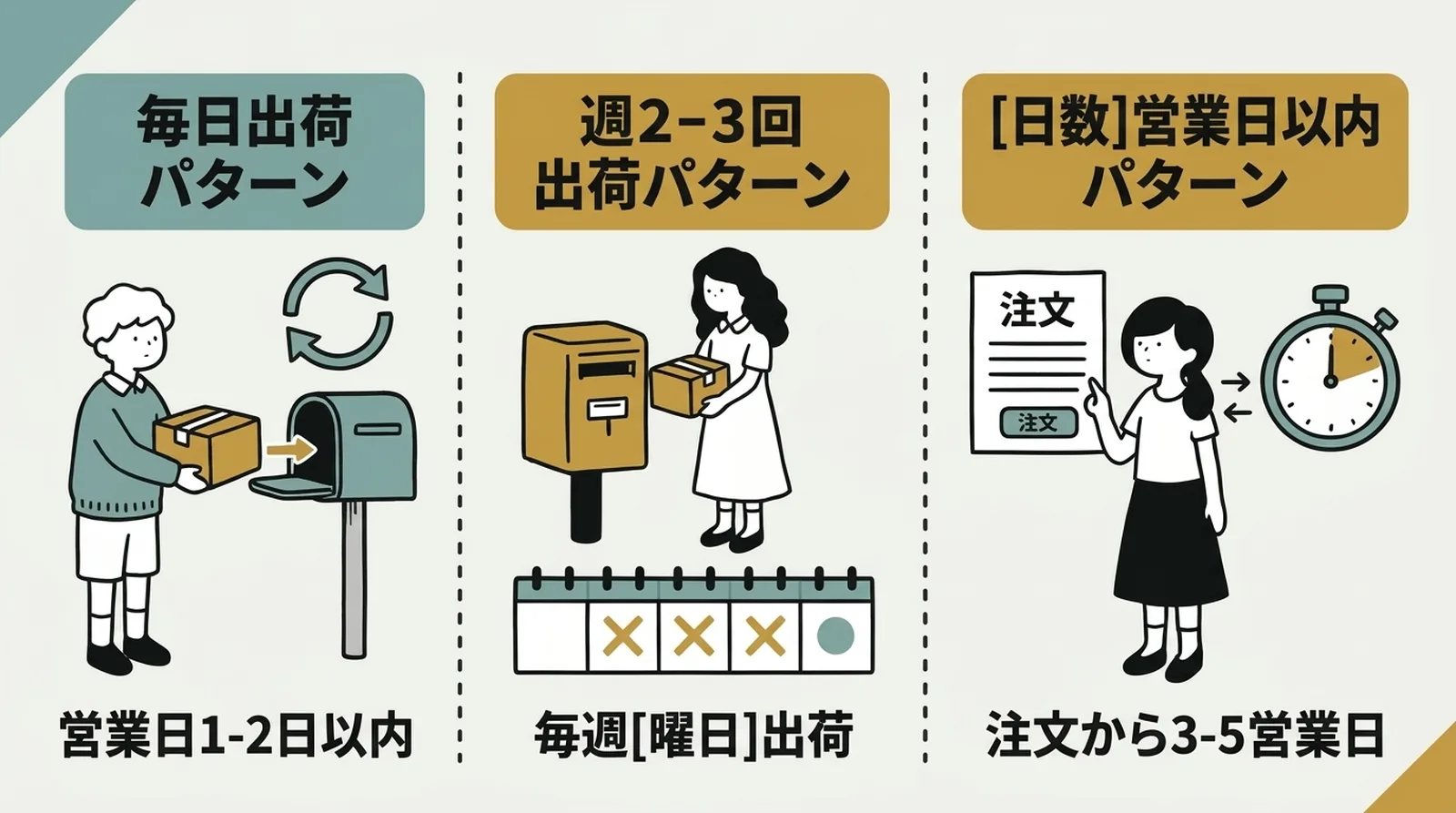
Three Shipping Schedule Patterns
Pick the pattern that fits your life
You don't have to ship every day. Shipping schedules for small stores fall into three broad patterns.
| Pattern | How often | Best for | Example wording for customers |
|---|---|---|---|
| Daily shipping | Every weekday | Full-time sellers, people who are home most of the day | "Ships within 1-2 business days of your order" |
| 2-3 times a week | Fixed weekdays | Side-business sellers who can handle specific days | "Ships every Mon, Wed, and Fri" |
| Within X business days of the order | Irregular | Made-to-order sellers, people with unpredictable schedules | "Ships within 3-5 business days of your order" |
Whichever you choose, customers trust you as long as you keep to the estimate. A store that says "ships next day" but takes 3 days looks worse than one that says "within 5 business days" and delivers in 3.
Set your estimate on the number of days you can reliably keep, not the fastest you could possibly ship.
How to Set Your Shipping Estimate
1. List the weekdays you can ship
Start by writing out your week around your main job. Then look for the days when you can set aside 30 minutes to pack and drop off parcels.
If you work full-time on the store, you can batch shipping during the day. With a side business, it is more realistic to pack in the evening and post the parcels the next morning, or to ship everything on the weekend. For how to choose a start time for shipping, see Building a Shipping Routine.
2. Use the slowest case as your base
Base the estimate on how many days it takes to ship in your busiest week.
Say you ship on Monday, Wednesday, and Friday, and count business days with weekends and public holidays off. The longest wait is for an order placed after you finish shipping on Monday or Wednesday, which has to wait 2 business days for the next shipping day. That slowest case is the number to give customers.
| When the order comes in | Next shipping day | Business days until shipping |
|---|---|---|
| Monday (after shipping) | Wednesday | 2 business days |
| Tuesday | Wednesday | 1 business day |
| Wednesday (after shipping) | Friday | 2 business days |
| Thursday | Friday | 1 business day |
| Friday (after shipping) to Sunday | Monday | 1 business day |
An order placed on Friday night is 3 calendar days from Monday. Because you're off on weekends, though, it counts as 1 business day.
3. Add 1 day of buffer
Illness or unexpected overtime can keep you from shipping on the planned day. If you add 1 day to the base of 2 business days and write "ships within 3 business days of your order," you still meet the estimate when shipping slips by a business day.
Don't pad it too much, though. A long cushion makes your store look slow, so about 1 day is a good balance.

Where to Post Your Shipping Schedule: Keep All 3 Places the Same
Limit it to three places
Put your shipping schedule in the three places customers actually see:
- Product page (the product description)
- Shipping policy (a fixed page on your store)
- Order confirmation email (Shopify's automatic email)
With the same wording in all three, customers don't end up saying "that's not what I was told."
Product page example
In the product description, a short note gets read more often than a long explanation.
Shipping
- Ships: every Monday, Wednesday, and Friday
- Method: Click Post (dropped in a mailbox, tracking included)
- Estimated delivery: 1 to 3 days after shipping
Shoppers check shipping details right after reading about the product. Place the note where it shows up without scrolling.
What to write in your shipping policy
Along with the shipping estimate, state your exceptions in a single sentence. For example: "We do not ship on weekends or public holidays," or "Shipping may be delayed around the year-end holidays and events." For how to write the whole policy, see How to Write a Legal Notice and Shipping Policy.
Adding a line to the order confirmation email
Shopify sends the order confirmation email automatically. Adding a line such as "Please allow about X business days for shipping" eases customers' minds right after they order.
You can edit the template in your Shopify admin under Settings → Notifications → Order confirmation.
Handling Busy Periods
Order spikes after events and sales
You might normally get around 10 orders a week, then see a rush after an event or sale. In my case, I've had more than 100 orders in a single day during a busy period.
For a side business, an unusual volume like that is especially hard to absorb. The best defense is to announce it ahead of time.
- Before a sale starts, post on social media or a store announcement that shipping may take longer than usual
- Temporarily lengthen the estimate on product pages (for example, 3 business days to 5 business days)
- Switch back to the normal wording once the sale ends
Changing shipping days temporarily
If you can't ship for a while because of a long holiday or a business trip, announce it in advance on your store's home page or social media. Even for a sudden change, adding a line to the order confirmation email changes how customers feel about it.
A parcel that arrives earlier than expected is a pleasant surprise, while one that arrives later than expected causes worry. If you expect trouble keeping to the estimate, it's safer to lengthen it up front.
Managing Customer Expectations
The difference between "slow" and "as promised"
People who order from a small shop don't expect next-day delivery like a big marketplace. What does cause worry is not knowing when the order will arrive.
Three things are enough to manage expectations: state the estimate clearly, keep to it, and send a notification when the parcel ships.
Always send a shipping notification
Once an order ships, send a shipping confirmation email with the tracking number. When you mark the order as fulfilled, Shopify's standard feature sends the notification automatically. If the email includes the tracking number, customers can check delivery status themselves.
Most "it still hasn't arrived" messages happen because the shipping notification never reached the customer. As Building a Shipping Routine also notes, pairing the tracking number update with the notification cuts down on these inquiries.
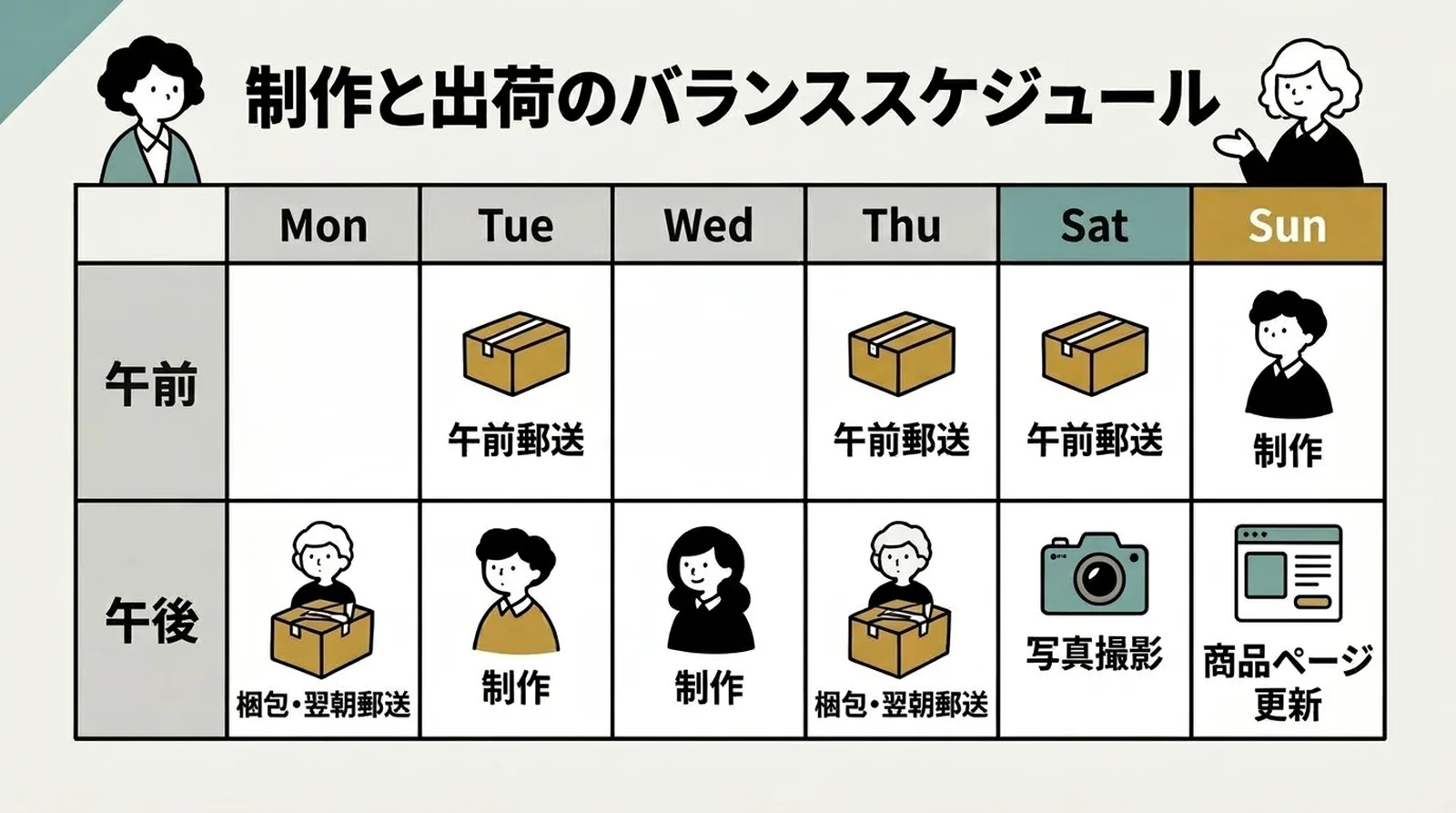
A Schedule for Both Making and Shipping
Once you've chosen shipping days, use the rest for making
What a side-business seller most wants to avoid is being so busy shipping that there's no time left to make things.
As How to Balance Making Products and Shipping Orders explains in more detail, fixing your shipping days and times lets you separate "today is a shipping day" from "today is a making day."
If you ship 3 times a week (Monday, Wednesday, Friday), for example, Tuesday and Thursday are free for making. If your weekends are open, you can also make things on weekends and ship on weekdays.
Sample schedule
| Day | Morning (before work or in the morning) | Evening (after getting home) |
|---|---|---|
| Mon | — | Pack, post next morning |
| Tue | Post parcels in the morning | Making |
| Wed | — | Pack, post next morning |
| Thu | Post parcels in the morning | Making |
| Fri | — | Pack, post next morning |
| Sat | Post parcels in the morning | Making, photography |
| Sun | — | Making, product page updates |
Finish only the packing in the evening, then drop the parcels in a mailbox on your way to work the next morning. That way you don't have to spend your whole evening on shipping.
Frequently Asked Questions
Q. Does writing "ships next day" help sell more?
Same-day or next-day shipping can push a customer toward buying. But a promise you can't keep costs you trust. At a small shop, "within 3 business days" sells just fine if the product itself is appealing. Setting a number you can reliably keep brings more repeat customers than rushing to meet an unrealistic one.
Q. How should I word it for made-to-order items?
It's clearest to list the making time and the shipping date separately. Splitting it into stages, such as "5 to 7 business days to make, ships within 2 business days after it's finished," lets customers see that the whole thing takes about 10 days.
Q. Should I contact customers in advance if shipping will be late?
Yes. If you're likely to go past the estimate, send a message before the order ships. A single line such as "Your order is expected to ship 1 to 2 days later than usual" goes a long way toward easing a customer's worry. Going late with no word at all leaves a worse impression.
Summary
Set your shipping estimate on the number of days you can reliably keep, not the fastest you could manage. If you're running a side business, decide which weekdays you can ship, then add 1 day to the business days of the slowest case. That gives you a schedule that doesn't strain you.
Use the same wording on product pages, in your shipping policy, and in the order confirmation email. When the same information appears in several places, customers feel reassured.
The whole flow from CSV export to tracking number updates is covered in Streamlining Shopify × Click Post Shipping.
Once your shipping days are fixed, spend the remaining time on making. Along with a fixed schedule, a setup that handles everything from the CSV export to tracking number updates in one go can cut the time spent on shipping itself. Try Instant Shipping! for Click Post to get shipping done quickly in the time you have.